Lenders & credit boxes: your capital sources, plus 6,000+ more
Lenders (sidebar → Records → Lenders) does two jobs. It’s the system of record for the capital partners you already work with — how much you’ve deployed with each, on which deals. And it’s a searchable directory of 6,000+ lenders, each described by a credit box, that you can filter against a live deal and adopt into your own list. Those credit boxes power the automatic Matching Lenders section on every deal.
What’s a credit box?
Section titled “What’s a credit box?”A credit box is the set of rules describing what a lender will fund:
| Dimension | Example |
|---|---|
| Geography | OH, FL, GA — or nationwide |
| Asset classes | Single Family, Duplex, Multi-Family |
| Loan purpose | Flip, Rental |
| Loan size | $100k–$3M |
| Max leverage | 80% LTV · 95% LTC · 75% ARV |
| Pricing | 9.5–12% · 1.5–3 points |
| Term & credit | up to 24 months · 660+ FICO |
| Rehab funding | Yes / No |
Any dimension left blank means “no restriction” — a lender with no geography matches every state.
My lenders and the directory
Section titled “My lenders and the directory”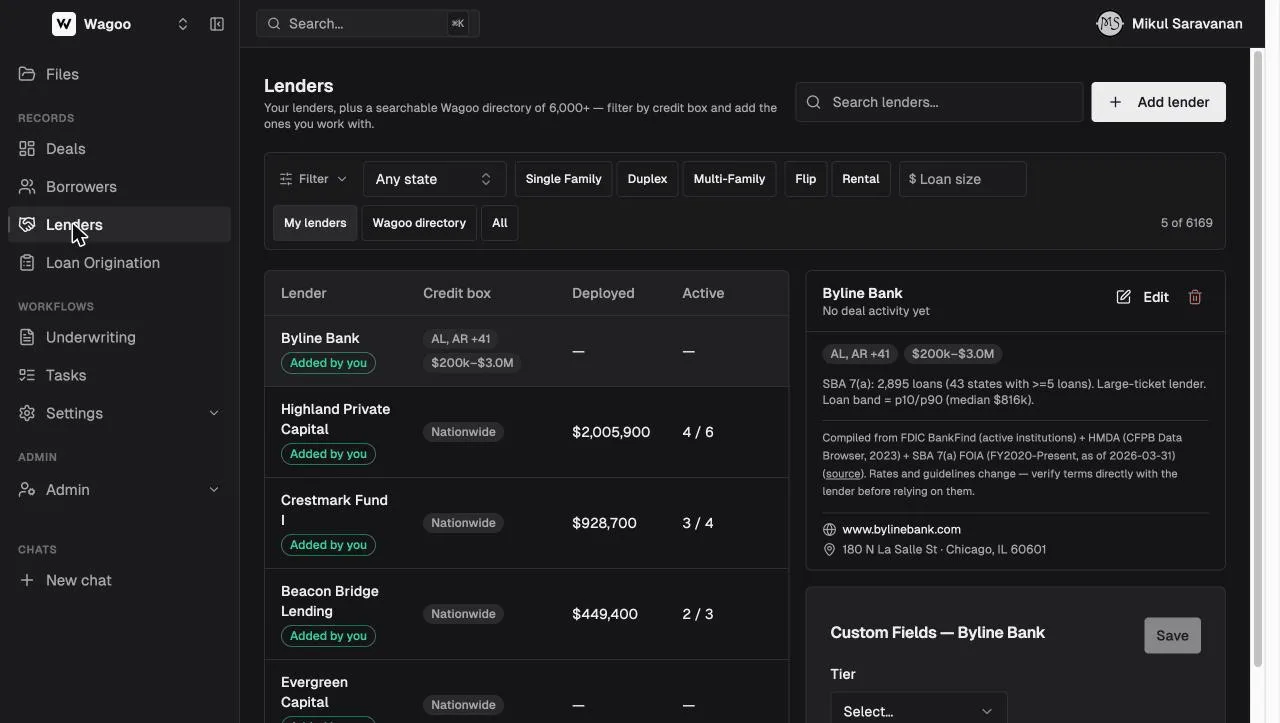
The view toggle switches between My lenders (default), Wagoo directory, and All. The table (search box “Search lenders…”) shows:
| Column | Notes |
|---|---|
| Lender | Name + a source pill — “Added by you” or “Wagoo directory” |
| Credit box | Summary chips (e.g. “Nationwide”, “OH, FL +3”, “$100k–$3M”, “30-yr terms”) + a pricing line |
| Deployed | Total dollars you’ve allocated to this lender across deals |
| Active | Active (current / in-review) deals / total deals |
| (trailing) | A ghost + button (“Add to my lenders”) on directory rows you haven’t adopted; hidden in demo |
The list is relevance-sorted (your lenders → box completeness → deployed → alphabetical) and caps at 100 rows, with a footer “Showing 100 of {N} — refine the filters to narrow the list.” Deployed/Active come from your deals’ lender splits.
Filtering by credit box
Section titled “Filtering by credit box”Click Filter to expand the advanced row and narrow the list to lenders whose boxes fit a specific deal.
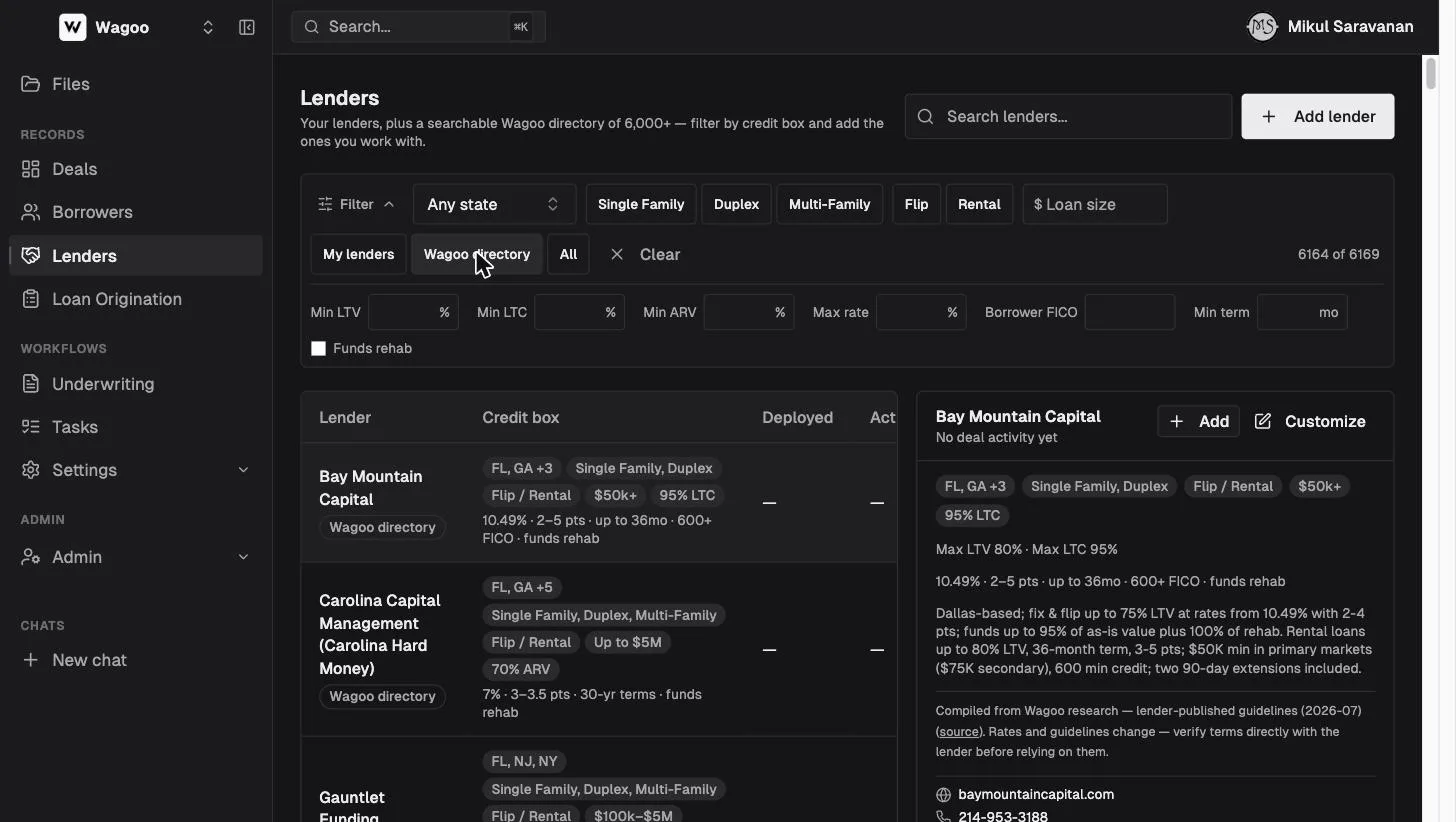
- Quick filters: State (“Any state”) · Asset class (Single Family / Duplex / Multi-Family) · Scope (Flip / Rental) · Loan size ($).
- Advanced row: Min LTV · Min LTC · Min ARV · Max rate · Borrower FICO · Min term · Funds rehab (checkbox).
The count on the right renders without separators (“6164 of 6169”) and updates live; Clear resets filters and the view to My lenders. A lender passes a filter if the value fits its box or it left that dimension unrestricted, so filtering never wrongly excludes a nationwide, any-size lender.
The lender detail panel
Section titled “The lender detail panel”Selecting a row opens the panel (the first row is auto-selected):
- Header — name, ”{$X} across N allocation(s)” (or “No deal activity yet”), and actions: Add (adopt a directory lender), Edit (if you already have a tenant account for it) or Customize (a pure directory lender), and Remove (your own accounts only). Actions are hidden in demo.
- Credit box — chips, a Max LTV/LTC/ARV line, the pricing summary, and Notes.
- Provenance — “Compiled from {dataset}” with an optional “(source)” link, then ”. Rates and guidelines change — verify terms directly with the lender before relying on them.”
- Contact — website, phone, email (a
mailto:link), and location where known. - Allocation history — deals you’ve allocated to this lender (matched by name); click through to the deal.
- Custom Fields — {name} — lender-scoped fields your admin defined.
Removing confirms first: “Remove {name}? This removes the lender from your directory. Deal allocations and history are kept.” (toast “Lender removed”) — it’s a soft delete, so historical allocations survive.
Adding, customizing, and editing lenders
Section titled “Adding, customizing, and editing lenders”Click “Add lender”, or Edit / Customize on an existing one.
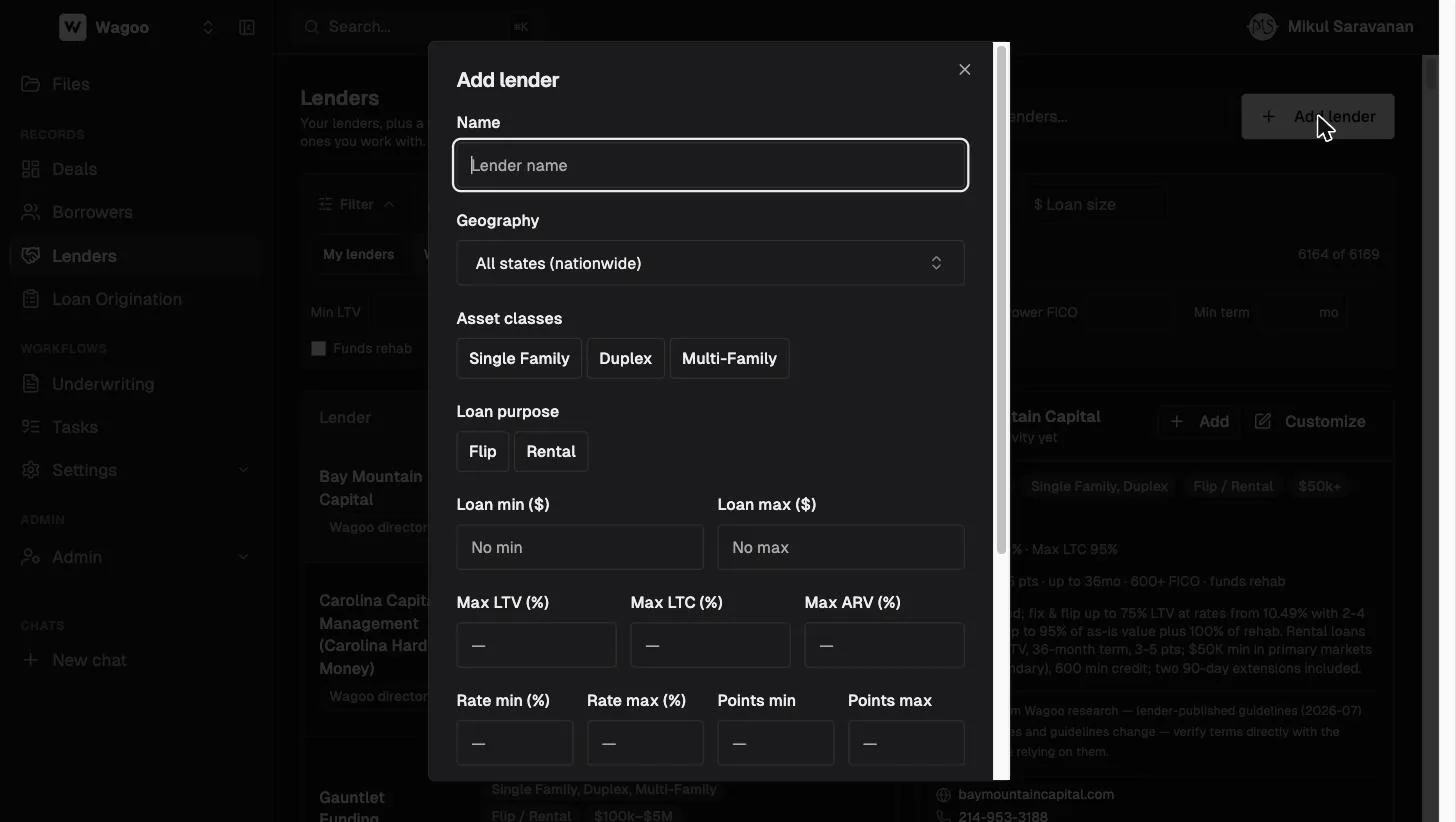
Dialog titles are “Add lender”, “Edit lender”, or “Customize for your team”; the save button reads “Add lender”, “Save changes”, or “Save to your lenders”. Fields:
- Name
- Geography — multi-select states; empty = “All states (nationwide)”
- Asset classes — Single Family / Duplex / Multi-Family
- Loan purpose — Flip / Rental
- Loan min ($) / Loan max ($)
- Max LTV / LTC / ARV (%)
- Rate min/max (%) and Points min/max
- Max term (mo) · Min FICO · Rehab funding (Yes / No toggle; leaving it unselected means “unknown”)
- Notes
How deal-to-lender matching works
Section titled “How deal-to-lender matching works”When you open a deal, Wagoo compares its state, asset class, purpose, loan size, term, and rehab funding against every credit box — yours and the directory’s — and ranks the results:
- Strong fit — clears every populated dimension with nothing unconfirmed.
- Possible fit — no violations but at least one unconfirmed dimension (or a minimum-FICO floor, which always caps a match at Possible).
- Any single violation hides the lender entirely.
Matches come with plain-English reasons, so you can sanity-check each one. The takeaway: the accuracy of your credit boxes is the accuracy of your matches — a five-minute box cleanup pays off on every future deal.
Frequently asked questions
Section titled “Frequently asked questions”Where does the directory data come from? Compiled from public and published sources (regulator data and lender-published guidelines), with the source noted on each entry. Always confirm live terms with the lender.
What happens when I add a directory lender? It becomes one of your lenders — editable, allocatable on deals, and tracked for deployed capital. The directory original is untouched, and the adopted copy starts with the directory’s data until you edit it.
Can I edit a directory lender without adopting it? No — Customize creates your own copy with your edits. Your team’s knowledge never leaks into (or gets overwritten by) the shared directory.
Why does a lender with a blank geography match everything? Blank dimensions mean “no known restriction.” If you know a lender is state-limited, set the states and the match quality improves immediately.
Does removing a lender break old deals? No. Removal only takes them out of your directory; every historical allocation stays on its deal.
Related: Matching Lenders on a deal · Lender splits